
Playing ZUDOKU · An interactive read
Daily Dojo: One Challenge, One Useful Review
Understand the difference between Daily Dojo and web practice, prepare for the daily challenge, and review time, mistakes and hints without chasing a streak at any cost.
The idea to take away
Use the Android challenge screen for the actual Daily Dojo attempt. Prepare on a separate practice puzzle, check the active rules, and review one decision after the result.
Daily Dojo and a daily practice habit are different
You can practise Sudoku every day on any suitable puzzle. Daily Dojo is a specific ZUDOKU challenge with shared daily content and a recorded result. The official overview describes one daily puzzle, streaks and a leaderboard where mistakes and hints matter. Its “Practice online” link currently opens Standard Sudoku. It does not start a browser Daily Dojo attempt. [1]
Open the Daily Dojo screen in the Android app to see the challenge offered to your account. Read its status, rules and remaining time before starting. Feature availability can change, so a website description should not be treated as proof that a particular app version or account can enter today. [3]
This guide proposes a way to prepare and review. It does not claim that daily play produces a particular improvement, or that every completed practice board earns a challenge result.
Before you spend the attempt
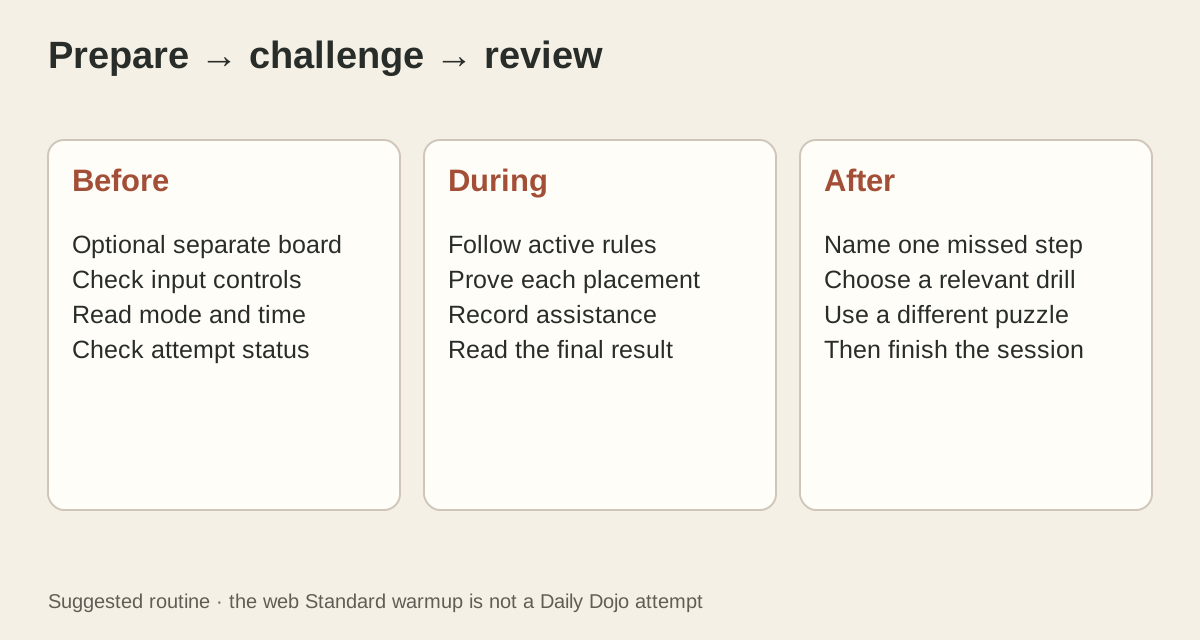
Use a separate, familiar Standard puzzle as an optional warmup. Check that your inputs work as expected: cell selection, number entry, notes and erase. This is particularly useful after changing devices. You are testing the controls, not trying to earn a fast warmup time.
Next, name the actual challenge mode. In classic Sudoku, rows, columns and boxes each constrain the same digits. [4] If the challenge adds cages, diagonals or another rule, read that rule before applying a familiar scanning routine. A digit can satisfy its row and still violate the additional constraint.
Choose an uninterrupted window that fits the time shown in the app. Treat a used, failed or expired attempt as a status to read carefully; do not assume restarting buys another ranked try. If the status is unclear, read the screen before tapping Start rather than experimenting on the scored attempt.
Keep a small routine during the board
Pick a repeatable scan. For example, inspect a nearly completed house, then follow any new placement into its intersecting houses. When that stops working, choose one digit and inspect its remaining positions. These are suggested organisational choices, not a claim that one scan is fastest for everyone.
Before an entry, ask whether you have proved a placement or merely found an allowed candidate. Suppose a cell permits both 2 and 7. The fact that 2 fits is not a reason to select it. Leave the alternatives in notes until another constraint distinguishes them.
If you make an error, pause the rapid input sequence. Recheck the selected cell and the deduction behind the last entry. Do not turn a single wrong tap into several unsupported placements. If you use an available hint, include that in the review instead of comparing the result with a no-hint solve as though they were identical.
Compare the whole result, not just the clock
The official feature page explicitly connects leaderboard timing with mistakes and hints. Read the app’s displayed scoring explanation and final result rather than inventing a ranking formula from elapsed time alone. [1] A faster displayed solve time need not tell the full story.
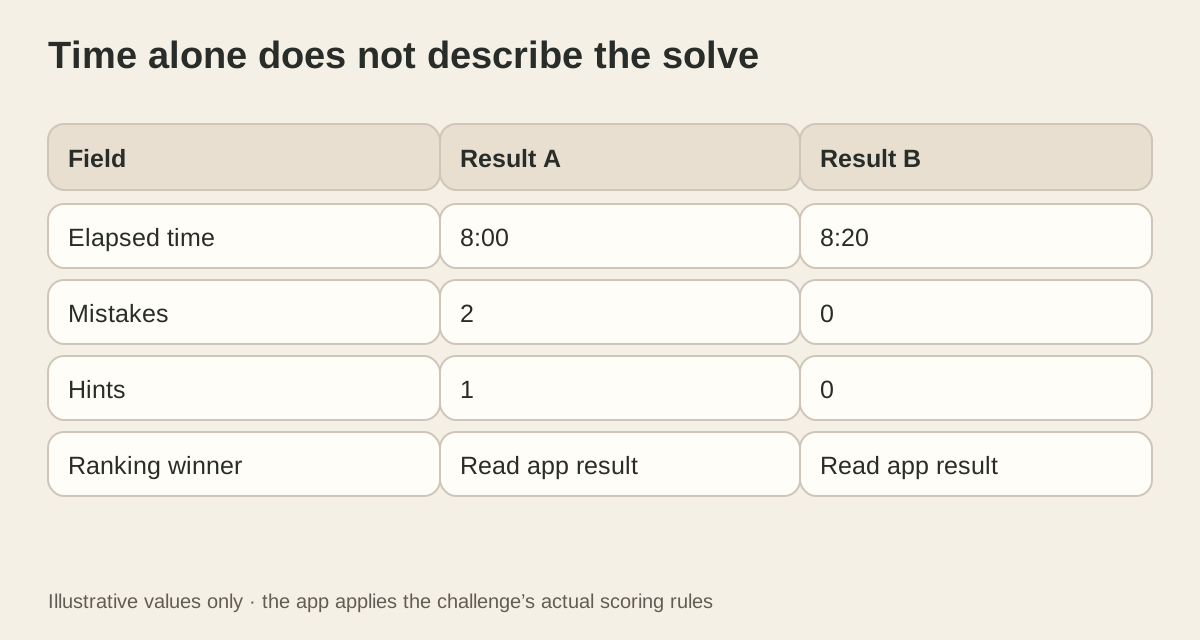
For a personal record, keep three fields: elapsed time, mistakes and hints. Add the mode and difficulty. Compare like with like, and record an interrupted attempt honestly. A leaderboard compares players within its rules; your notebook can answer the narrower question of what you overlooked.
Saved awards and cross-device progress require sign-in; guest web practice is not an earned Dojo result. The Awards Vault states this account distinction explicitly. [2] Check the completion status and sync message before assuming a reward has been recorded.
Choose one follow-up, then finish
Here is an illustrative review: “I spent the stall looking for a cell with one candidate. The useful question was where 8 could go in the upper-left box.” The follow-up is a box-by-digit scan on a different practice puzzle, not an attempt to replay today’s leaderboard entry for a better time.
A different note might be “I had the right digit but tapped the neighbouring cell.” That calls for an input check, not a more advanced technique. Separate a control error, a missing rule and a deduction you have not learned. Each suggests a different next session.
A streak can be an enjoyable record of returning, but it does not need to decide your schedule. If a day is inconvenient, leave it. The next useful practice session can still begin with one clear question.
Check your Dojo routine
Go to the evidence
Sources & further reading
Research checked on 14 October 2026. Follow the original sources to explore the evidence and its limits.
- ZUDOKU: Daily Dojo
Official feature overview. Its online practice link opens Standard Sudoku, not a browser Daily Dojo attempt.
- ZUDOKU: Awards Vault
Official sign-in requirement and rarity filters, reviewed alongside renderAwards in the website code.
- ZUDOKU Terms: features and virtual items
Sections 3, 8 and 12: accounts, virtual items and changing feature availability; reviewed 14 October 2026.
- Nikoli: Sudoku rules
Original publisher rules for digits, rows, columns and boxes. Accessed 14 October 2026.
Keep exploring